The bigger picture
According to the UK's Health and Safety Executive, over 500,000 workers report a work-related musculoskeletal disorder each year, contributing to millions of lost working days. Many organisations rely on tick-box DSE forms but have limited day-to-day visibility of how people actually sit — especially at home. DeskCheck doesn't diagnose or treat; it gives employees quick, private posture awareness they can act on between formal assessments.
Why HR and wellbeing leaders choose DeskCheck
DSE-friendly, at scale
Run checks across tens or hundreds of employees in days, not months, and get simple, high-level summaries of completions and outcome bands to support your DSE audits and wider wellbeing programme.
No installs or hardware
Runs in the browser using the employee's webcam. No apps to deploy, no sensors to ship, and minimal IT involvement.
Privacy-first posture insight
No video is recorded or stored. DeskCheck analyses anonymous posture landmarks, and you only ever see high-level outcomes — never detailed camera footage.
AI posture scan in progress
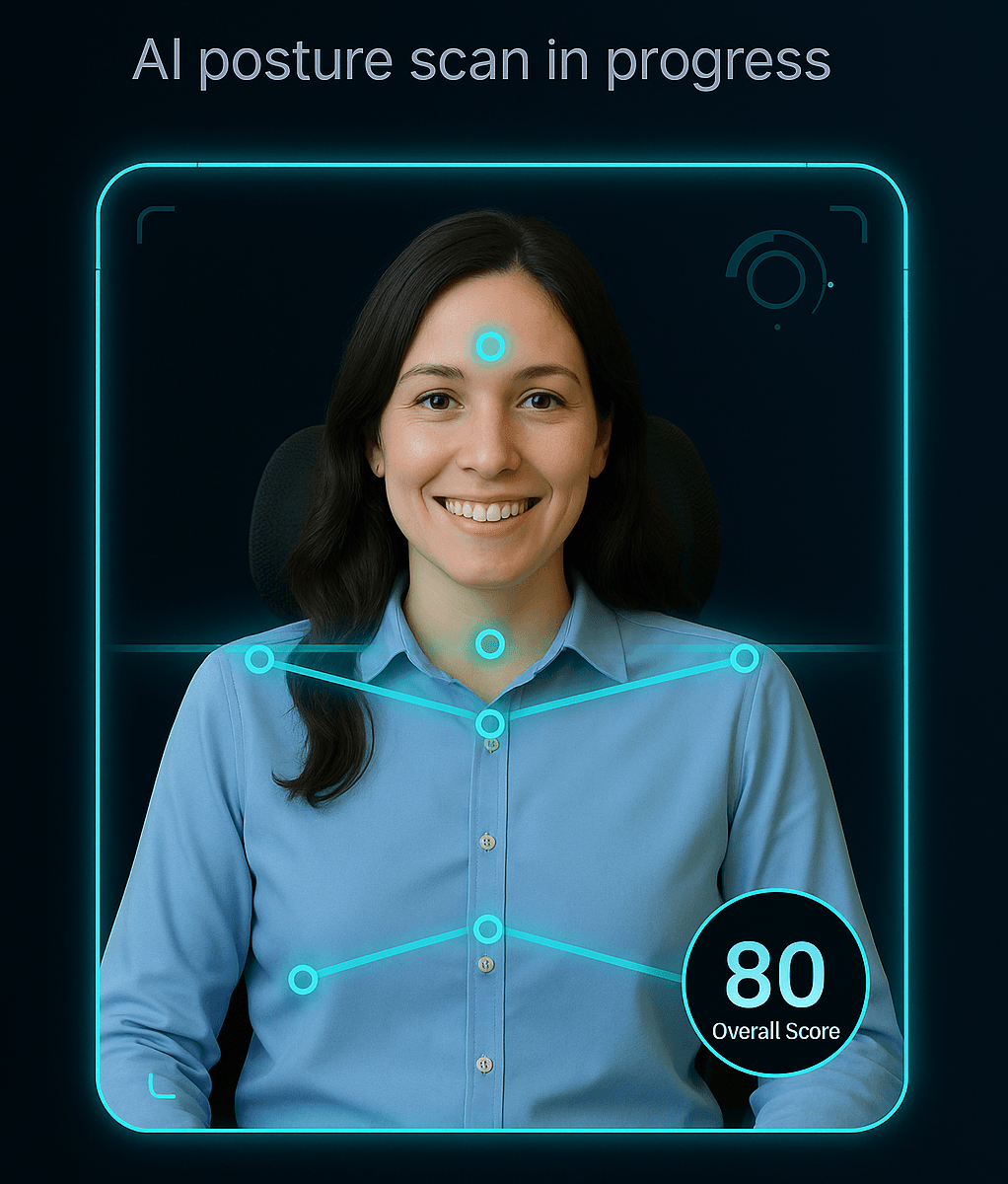
Employees see a calm, wellbeing-focused posture scan — clear, simple, and non-clinical.
For HR & wellbeing teams
- • Reach office and home workers without sending assessors.
- • Capture consistent posture data to support wellbeing and DSE programmes.
- • Spot patterns in posture results and decide where to focus extra support.
- • Demonstrate you've offered reasonable, practical guidance.
For employees
- • Quick, non-judgemental scan that feels helpful, not scary.
- • Simple language and clear “do this next” suggestions.
- • Extra wellbeing tips around healthy desk habits.
- • No video stored — we literally can't replay it.
- • Optional PDF to keep or share with a manager.
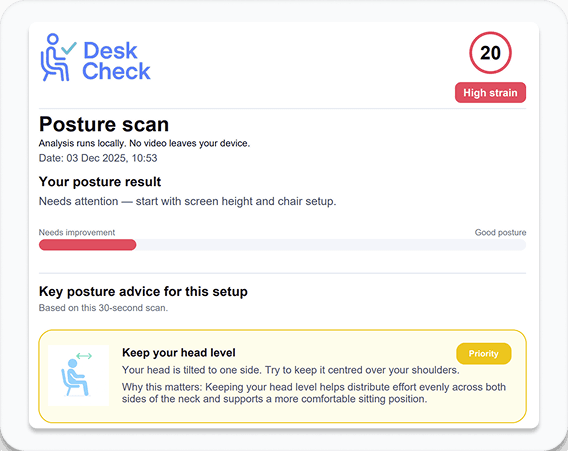
A simple PDF employees can keep or share
After each scan, employees get a calm, wellbeing-focused summary: their posture result, priority areas to work on, and a handful of clear tips they can act on straight away or share with an ergonomics lead or manager.
- • Easy to read, non-clinical language.
- • Highlights what matters most, not every tiny metric.
- • Gives HR a tangible outcome without exposing full details.
How DeskCheck works
DeskCheck runs directly in the browser using your webcam. In around 30 seconds it captures posture landmarks, analyses your seated position, and returns simple, practical advice — whether you're in the office or working from home.
- 1. Turn on your webcam and sit as you normally would.
- 2. Our AI tracks posture landmarks — not raw video frames.
- 3. You get quick, clear recommendations to improve your setup.
Privacy, by design
We don't store or stream video. Posture analysis is based on anonymous landmarks only, built for organisations that care about privacy as much as wellbeing.
- • No video saved to our servers
- • Landmarks only, processed securely
- • Built for HR & wellbeing teams, not surveillance
Get early access for your team
We're running a limited pilot with companies who want a simple, privacy-first way to run posture checks across their teams and add something tangible to their DSE and wellbeing programme. Share a few details and we'll get in touch with next steps.
What you get in the pilot
- • Access for a group of employees via a company code
- • Web-based posture check and PDF report for each scan
- • High-level summary of participation and posture score bands (no individual reports)
- • Direct input into the roadmap and future pricing for early adopters
What we ask from you
- • A named HR / wellbeing contact for the pilot
- • Help sharing DeskCheck with your team (we can provide template comms)
- • Optional 30-minute feedback call at the end of the pilot
Prefer to see it first?
Book a 20-minute demoFrequently asked questions
Is DeskCheck a medical device?
No. DeskCheck provides general ergonomic guidance and wellbeing advice. It doesn't diagnose medical conditions and isn't a replacement for occupational health or clinical assessment.
Do employees need to install anything?
No. DeskCheck runs in a modern web browser with a webcam. There are no downloads, apps, or browser extensions to manage.
Can you replay or store employees' video?
No. We never store raw video. DeskCheck analyses anonymous posture landmarks only, so we literally can't replay a recording of their scan.
Do you share individual posture results with the company?
During the pilot, we only share anonymised, high-level insights such as participation rates and overall score bands. Employers do not see individual results.
Does DeskCheck replace our DSE assessments or training?
No. DeskCheck works alongside your existing DSE assessments and training by giving employees quick, personalised posture awareness. It helps you support office, home and hybrid workers between formal reviews, but it doesn't replace required DSE processes.
Is DeskCheck suitable for home and hybrid workers?
Yes. DeskCheck runs entirely in the browser, so employees can do a quick posture check wherever they work. It's a simple way to extend wellbeing and DSE support to remote staff without arranging home visits.